
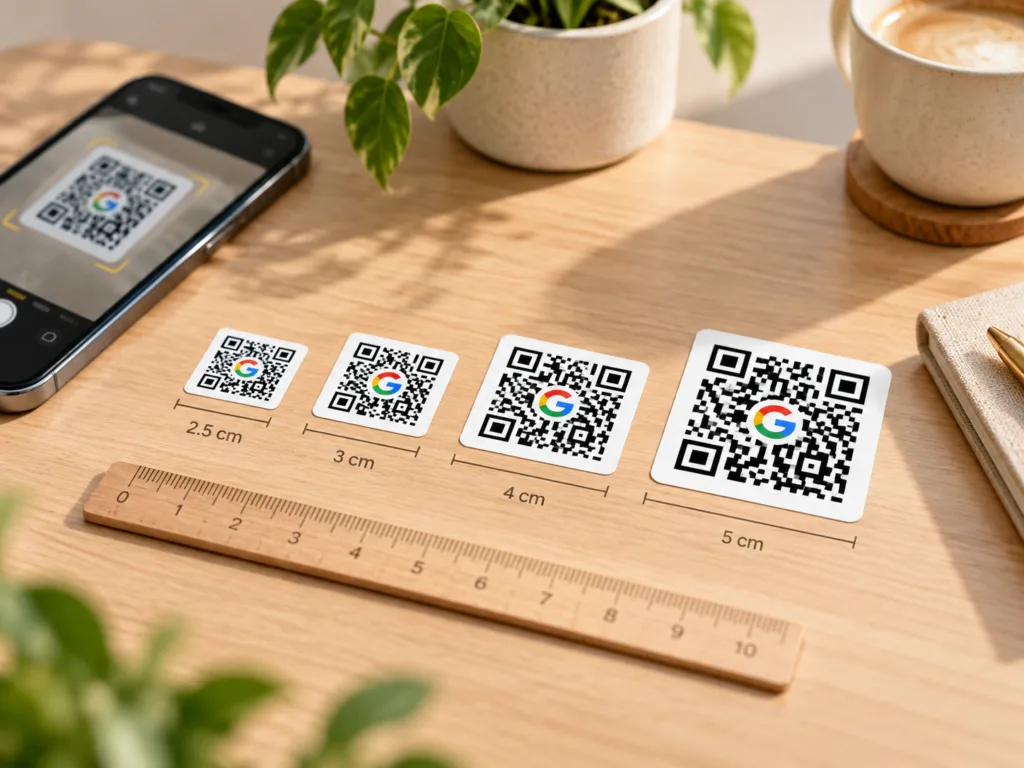
Choosing the right QR code sticker size is less about one universal minimum and more about how the code will be used. A simple web link on a clean high-contrast label can work at a smaller size than a dense code with a logo, decorative text or a more complex destination.
Quick answer
For most product labels and packaging, 3–4 cm is a comfortable starting range. Smaller labels can work, but they leave less room for error. Larger labels are better when customers will scan from further away, when text surrounds the code, or when a logo is placed inside it.
| Sticker size | Best suited to | What to watch |
|---|---|---|
| 2.5 cm | Compact packaging and simple QR destinations | Keep the design simple and test carefully |
| 3 cm | General labels and product packaging | Avoid oversized centre logos |
| 3.5–4 cm | Business labels, QR plus short text, easier everyday scanning | Good all-round choice |
| 4.5–5 cm+ | Counter displays, parcels, signs and scans from a little further away | Useful when visibility matters more than compact size |
1. The QR code needs a clear quiet zone
A QR code is not just the black-and-white square. It also needs a clear margin around it, commonly called the quiet zone. Decorative borders, text, patterns or a dark background that crowd this area can reduce scan reliability.
If the sticker itself is very small, the quiet zone takes up a meaningful part of the available space. That is one reason a 3.5 cm label can be much more forgiving than a 2.5 cm label even though the difference sounds small.
2. More data can mean a denser code
A short website address usually creates a simpler QR pattern than a long URL or a large block of encoded information. Denser patterns contain smaller modules, so print quality and final size become more important.
Where possible, use a clean destination link rather than unnecessarily long encoded content. If you are supplying your own QR code, send the highest-quality version available rather than a screenshot.
3. Logos inside QR codes need extra care
A centre logo can look professional, but it replaces part of the QR pattern. Error correction can compensate for some missing data, but small codes have less visual tolerance. For labels around 2.5–3 cm, we normally recommend keeping the centre area simple. If the logo is essential, consider a larger label and test the final artwork on multiple phones.
4. Contrast matters as much as size
Dark code on a light, plain background is the safest combination. Transparent labels, reflective surfaces, strong patterns or low-contrast colour combinations can make scanning less predictable because the surface behind the sticker becomes part of the visual result.
When using transparent material, plan the artwork around the actual surface where the sticker will be applied. A design that scans perfectly on a white screen may behave differently on dark glass or coloured packaging.
5. Think about scanning distance
A QR code on a candle jar is normally scanned from close range. A QR code on a counter sign or wall display may be scanned from much further away. The further the expected scanning distance, the larger the code should be.
Do not design only for how the label looks in a zoomed-in preview. Test it at the real printed size and from the distance your customer will actually use it.
6. Always test before committing to a large run
Scan the final code using more than one device if possible. Check it in normal indoor light, make sure the correct destination opens, and confirm that the printed quiet zone has not been cropped by a border or design element.
Which size should I choose?
If you want the safest general-purpose choice, start at 3.5–4 cm. Choose smaller only when space is genuinely limited and the QR design is simple. Choose larger when the code includes branding, surrounding text or will be scanned from further away.
Need custom QR code labels?
DHXart can generate the QR code for eligible products or print a high-quality code you already have.
Related questions
Do QR codes expire?
A QR code that directly stores a normal web address does not have its own expiry date. The destination still needs to remain available.
Can I put text around a QR code?
Yes, but leave a clear margin around the code itself. On smaller labels, surrounding text can make the design feel crowded, so increasing the sticker size usually gives a better result.
Can you print my existing QR code?
Yes. Supply the best-quality version you have and make sure you have tested the destination before ordering.